
SSO ID – SSO Rajasthan Portal , SSO ID Login & SSO Login & Register Guide
SSO ID (Single Sign-On ID) is a unique digital identity that allows users to access multiple government services through a single login. The SSO Rajasthan Portal is an important online platform launched by the Government of Rajasthan to provide easy access to various government services through one digital platform. It enables citizens, businesses, and government employees to use multiple departmental services and government portals with a single SSOID and password.
SSO ID Login
Step-by-step login
Registration
Create your SSO ID
Forgot SSO ID
Recovery methods
Emitra
E-Mitra Services
The Rajasthan Single Sign-On (RajSSO) system was introduced to make government services more accessible, convenient, and efficient while promoting digital governance across the state. If you are looking for information about SSO ID Registration Rajasthan, SSO ID Login, SSO ID Password Forgot, SSOID Recovery, or the different services available through the SSO Rajasthan Portal, this article will guide you through everything you need to know.
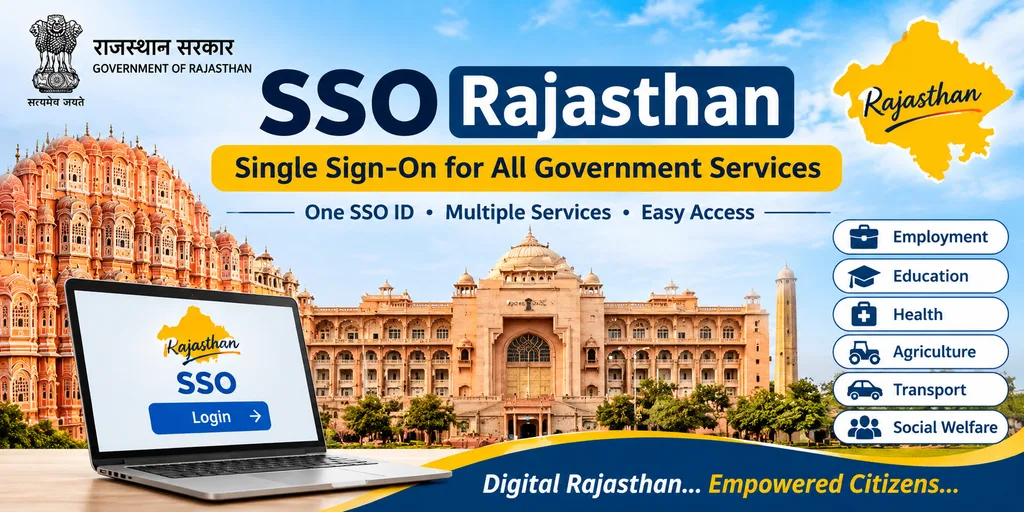
What is the SSO Rajasthan Portal?
The SSO Rajasthan Portal, also known as Rajasthan Single Sign-On, is an online digital service platform introduced by the Government of Rajasthan. It reduces the need for users to create separate User IDs and Passwords for different government services.
With a single SSO ID, eligible users can access various online services and applications offered by different Rajasthan government departments through one digital identity.
The primary objective of the SSO Portal is to make government services easily accessible to citizens through digital platforms and bring multiple departmental services together under a unified login system.
SSO Rajasthan Portal Overview
| Key Information | Details |
|---|---|
| Portal Name | SSO Rajasthan |
| Official Portal | sso.rajasthan.gov.in |
| Location | Rajasthan, India |
| Main Objective | Provides a unified digital platform to access multiple Rajasthan government services through a single SSOID. |
| Login Facility | Users can access different departmental services with one username and password. |
| Available Services | Government jobs, education, healthcare, banking, agriculture, transport, police, revenue, and social welfare services. |
| User Registration | Registration options may include Jan Aadhaar, Google, and other eligible identification methods, depending on the user category. |
| Login Security | Uses authentication methods and verification procedures to help protect user accounts. |
| User Dashboard | Offers a centralized dashboard where users can access available applications and government services. |
| Mobile Access | Government services can also be accessed through supported mobile applications. |
| Citizen Support | Users can seek assistance through the available official support channels. |
| Portal Updates | New services and digital facilities are added as part of the government’s e-governance initiatives. |
Note: Registration methods, helpline numbers, and security options may change. Users should verify the latest details through the official Rajasthan SSO portal.
Single Sign-On- Rajasthan Portal Overview
The Rajasthan SSO Portal provides numerous benefits by simplifying access to government services and making online processes faster, easier, and more convenient for citizens and government departments.
For Citizens
- Convenience: Access multiple Rajasthan government services using a single SSOID, eliminating the hassle of managing different usernames and passwords.
- Time-Saving: Apply for various services online, complete tasks quickly, and reduce paperwork and unnecessary visits to government offices.
- Data Security: Built-in security measures and authentication methods help safeguard personal information and prevent unauthorized access.
- Easy Accessibility: The user-friendly portal enables citizens to access government services through online platforms, mobile applications, and authorized service centers.
For the Government
- Improved Service Delivery: Streamlined online processes help government departments provide faster services, reduce delays, and manage administrative tasks more effectively.
- Reduced Costs: Minimizes expenses related to paperwork, physical document storage, and manual record management through digital processes.
- Better Decision-Making: Provides valuable data and insights that support effective planning, improve service quality, and help government departments make informed decisions.
- Transparency & Accountability: Promotes transparent service delivery by making government services more accessible and helping build public trust in government departments.
SSO ID Login Guide – Step by Step
Follow these simple steps to log in to your SSO ID Rajasthan account:
- Open the Official Website: Visit the Rajasthan SSO Portal at sso.rajasthan.gov.in.
- Enter Login Details: On the login page, enter your registered SSO ID, username, or other accepted login credentials along with your password.
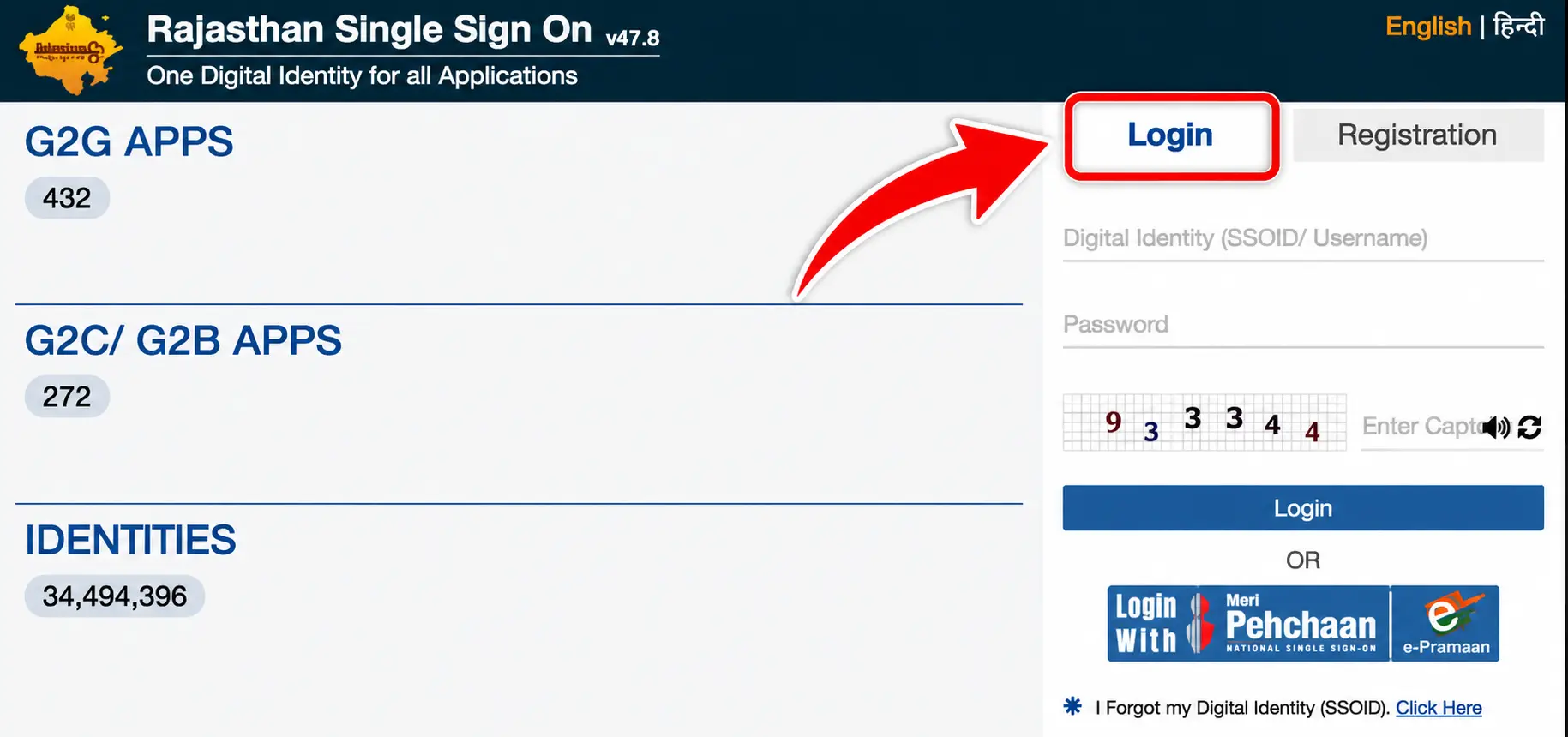
- Click the Login Button: After filling in the required details, select the SSO Login option to proceed.
- Access Your Dashboard: Once your credentials are verified, you can log in successfully and use the available services through your personalized SSO Rajasthan dashboard.
| Note: Make sure you enter your correct SSO ID and password while logging in. If you forget your password or face any login issues, use the available recovery options on the SSO Rajasthan official portal. Always access the SSO Rajasthan website through its official URL to keep your account secure. |
Services Offered on the SSO Rajasthan Portal
The SSO ID Rajasthan portal provides a centralized platform where citizens can access various online services offered by different Rajasthan government departments. With a single SSO ID and password, users can conveniently access services related to employment, education, healthcare, finance, land records, transportation, and other important sectors.
Government Services Available on SSO Rajasthan
- Employment Services: Search for government job opportunities, submit applications, check recruitment status, and receive employment-related updates.
- Education Services: Access admission facilities, scholarship applications, examination results, and other academic services.
- Healthcare Services: Get information about government health schemes, medical facilities, e-health services, and online appointment options.
- Financial Services: Use e-Mitra facilities, access Bhamashah-related services, make online bill payments, and explore other financial services.
- Land Record Services: Access land registration details, mutation-related facilities, and other property record services.
- Transport Services: Apply for driving licences, check vehicle registration details, and access permits and other transport facilities.
- Police Services: Explore online police services, submit complaints, track their status, and access available e-pass facilities.
- Revenue Services: Get access to property tax payments, land revenue information, and other revenue department facilities.
- Social Welfare Services: Apply for eligible pension schemes, welfare programmes, and government social benefit services.
- Agriculture Services: Find information about farming schemes, agricultural subsidies, loans, and other facilities available to farmers.
Other Online Facilities
Apart from departmental services, the Rajasthan SSO portal also provides access to several digital facilities that make everyday online activities more convenient.
- e-Governance: Access different government websites, digital platforms, and citizen-focused services from one place.
- e-Learning: Explore online educational resources, learning materials, training programmes, and skill development opportunities.
- e-Commerce: Access available digital marketplace facilities and online shopping-related services.
- e-Library: Find digital books, educational materials, reference documents, and other online learning resources.
Additional Departmental Services
The SSO Rajasthan platform also provides access to several specialized services managed by different government departments. Some of these include:
- Arms Licence: Submit online applications and check the progress of arms licence-related requests.
- Building Plan Approval System (BPAS): Access digital facilities for submitting and processing building plan approval applications.
- Disaster Management: Get access to emergency-related information, public alerts, and disaster management resources.
- Drug Licence: Apply for drug licences and access available renewal and application tracking facilities.
- GST Portal: Use GST-related online facilities, including registration, return filing, and tax payment services.
- Litigation Tracking: Check updates and monitor the progress of legal cases through available online facilities.
- Circuit House Management System: Access online booking and reservation facilities for government circuit houses.
SSO ID Registration Guide
Registering for an SSO ID Rajasthan account is a simple online process that allows users to access multiple government services through a single login. Follow the steps below to create your account successfully.
- Open the Official SSO Portal: Visit the Rajasthan Single Sign-On website at https://sso.rajasthan.gov.in/.
- Select the Registration Option: On the homepage, click the Register or New User option to begin creating your account.
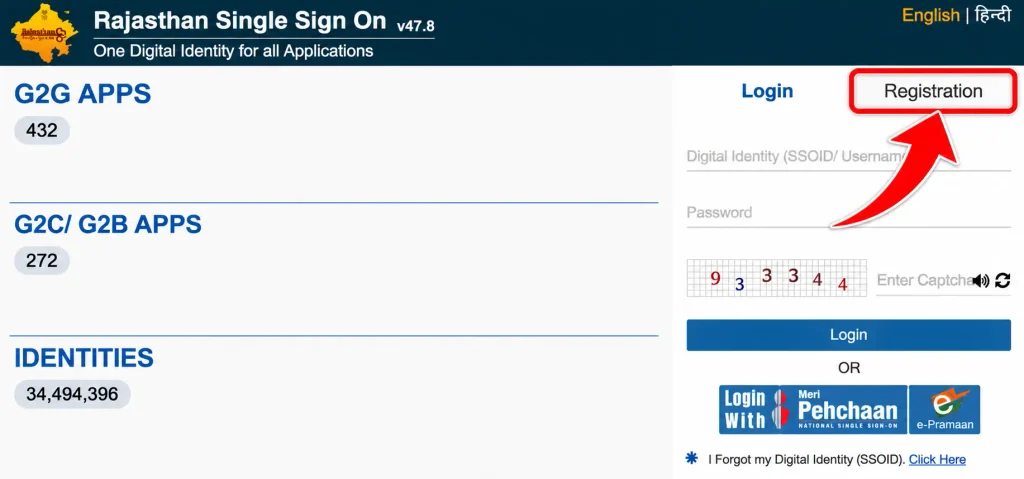
- Fill in the Required Details: Choose the appropriate registration category and enter the information requested on the screen. This may include:
- Full Name
- Mobile Number
- Email Address
- Aadhaar Number (where applicable)
- Create a Secure Password: Set a strong password for your SSO account. Make sure it is difficult to guess and easy for you to remember.
- Verify Your Information: Complete the required verification process. Depending on the selected registration method, you may need to confirm your details through an OTP or another available authentication method.
- Finish the Registration: Once all the required details have been submitted and verified, your SSOID will be generated. You can then use your SSO Login credentials to access the services available on the SSO Rajasthan portal.
Steps to Create a New SSOID Rajasthan
Creating a new SSO ID Rajasthan account is an easy online process. The Rajasthan Single Sign-On portal allows citizens, business owners, and government employees to register according to their respective user categories. Citizens can generally create an account using their Jan Aadhaar details or Google account. Follow these steps to complete the registration process.
Steps to Create a New SSO ID Rajasthan
- Visit the Official SSO Website: Open your browser and visit the official Rajasthan SSO portal at https://sso.rajasthan.gov.in/.
- Click on Registration: On the homepage, select the Registration option to open the new account registration page.
- Select Your User Category: Choose the appropriate registration category from the available options:
- Citizen
- Udyog (Business)
- Government Employee
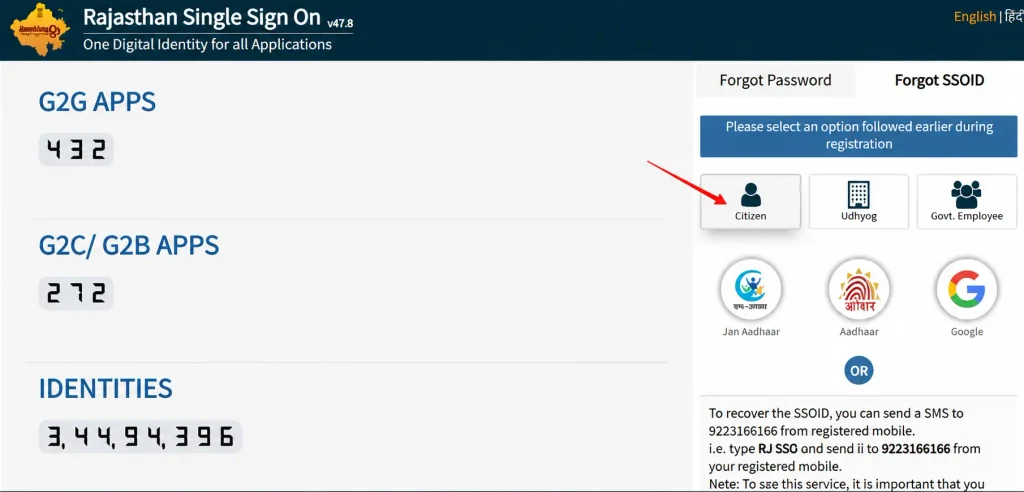
- 4. Choose a Registration Method: If you select Citizen, you can choose an available registration method, such as:
- Jan Aadhaar: For Rajasthan residents with a valid Jan Aadhaar number.
- Google Account: Use your existing Google account to proceed with registration.
- Enter the Required Details: Depending on your selected method, provide the requested information, such as your Jan Aadhaar number or Google account details.
- Complete OTP Verification: If you register through Jan Aadhaar, select the relevant family member and request an OTP on the registered mobile number. Enter the OTP to verify your details.
- Create Your SSO ID and Password: Choose an available username that will work as your SSO ID. Next, create a strong password to secure your account.
- Submit the Registration Form: Review the information you have entered and click the Register button to complete the process.
| Once registration is successful, your new SSO ID will be ready to use. You can log in to the Rajasthan SSO portal using your registered username and password to access the available online services. |
| Important Note: The registration process may differ for citizens, businesses, and government employees. Always use the official Rajasthan SSO website for account creation and verification. |
Eligibility Criteria to Create SSO ID
Before creating an SSO ID Rajasthan account, applicants should check the basic registration requirements. The portal offers access to various online government services, and users may need to meet the following conditions:
- Residency: Rajasthan residents can register for an SSO ID to access state government services.
- Age Requirement: Applicants should check the age conditions applicable to their selected service, as requirements may vary.
- Registration Documents: Users can register through available options such as Aadhaar Card, Jan Aadhaar Card, or other supported registration methods.
- Contact Details: An active mobile number and email address may be required for communication and account verification.
- Identity Verification: Applicants may need to provide valid identification details depending on the registration category and verification process.
Meeting the applicable requirements helps users complete the registration process and access the online facilities available through the Rajasthan SSO portal.
Benefits of SSO Rajasthan Portal
The SSO Rajasthan Portal makes accessing government services easier through a single online account. Some of its major benefits include:
- Single Login: Access multiple government services using one SSO ID and password.
- 24/7 Availability: Use available online services anytime and from anywhere.
- Time Saving: Complete various government-related tasks without visiting offices.
- Multiple Services: Access education, employment, healthcare, agriculture, and other departmental services.
- Application Tracking: Check the status of submitted applications online.
- Easy Payments: Pay supported government fees and utility bills online.
- Less Paperwork: Complete many processes digitally with reduced physical documentation.
- Transparency: Get updates about applications and access relevant service information easily.
| Note: The availability of services on the SSO Rajasthan Portal may vary depending on the user’s registration category and the concerned government department. Always use the official SSO Rajasthan website for secure access to government services. |
Update Jan Aadhaar Details Using Rajasthan SSO ID
- Visit the SSO Portal: Open the official Rajasthan SSO website at https://sso.rajasthan.gov.in/.
- Log In to Your Account: Enter your registered SSO ID, password, and captcha code to access your account.
- Open the Jan Aadhaar Application: After logging in, find and select the Jan Aadhaar option from the available citizen services.
- Select Profile Edit: Open the editing or profile update option to make changes to your existing Jan Aadhaar details.
- Enter Jan Aadhaar Number: Provide your Jan Aadhaar ID or enrolment number and search for your family record.
- Select Details to Update: Choose the family member or information that needs correction. Enter the updated details as required.
- Upload Supporting Documents: Attach the necessary documents as proof of the requested changes.
- Complete Aadhaar Authentication: Follow the on-screen instructions to complete the required Aadhaar e-KYC and authentication process.
- Submit the Request: Review all the information carefully and submit your update application for verification.
After submission, the request goes through the prescribed verification process. Once the required authorities approve the changes, the updated information is reflected in the Jan Aadhaar records.
How to Merge Citizen SSO ID?
If you have created multiple SSO ID accounts, you can follow these steps to request a merge:
- Log In to the Duplicate Account: Sign in using the temporary or duplicate SSO ID that you want to merge. Avoid logging in to your primary account.
- Open Edit Profile: After logging in, go to the top-right corner of the dashboard and click on the Edit Profile option.
- Select Deactivate Account: Scroll down and choose Deactivate Account. Look for the available option to merge your SSO ID.
- Complete Verification: Follow the on-screen instructions, provide the required primary account or employee details, and complete OTP verification.
- Confirm the Request: Review the account information and submit the merge request. Once approved, follow the portal’s instructions to access your services through the designated account.
| Note: The documented merge facility may apply specifically to Citizen SSO IDs being merged into Government Employee SSO IDs. Check the available options on the official portal before deactivating any account. |
FAQ’s
What is SSO ID Rajasthan?
SSO ID Rajasthan is an online single sign-on facility launched by the Rajasthan Government that allows users to access multiple government services through one username and password.
How can I create a new SSO ID Rajasthan?
Visit the official SSO Rajasthan portal, click on the Registration option, select your user category, enter the required details, and complete the verification process.
Is SSO ID registration free?
Yes, creating an SSO ID on the official Rajasthan SSO portal is free of cost.
How can I log in to my SSO ID account?
Visit sso.rajasthan.gov.in, enter your SSO ID, password, and captcha code, then click on the Login button.
Can I update my personal details through SSO ID?
Yes, you can access the Edit Profile option to update eligible account details. Some changes may require additional verification.
What should I do if I forget my SSO ID password?
Click on the Forgot Password option on the login page and follow the instructions to reset your password using the available verification method.