
How to Register SSO ID in Rajasthan – SSO Registration Guide
The SSO ID Registration in Rajasthan process allows citizens, business owners, and government employees to create an account on the Rajasthan SSO Portal. With a single SSO ID and password, users can access multiple online government services through one platform.
How to Register a New SSO ID in Rajasthan?
Creating a new SSO ID is a simple online process. Follow these steps to register your account through the official Rajasthan SSO Portal.
- Visit the Official Website: Open your browser and visit the Rajasthan SSO Portal at https://sso.rajasthan.gov.in/.
- Click on Registration: On the homepage, select the Registration option to open the new account creation page.
- Select Your User Category: Choose the appropriate category from Citizen, Udyog, or Government Employee, depending on your registration purpose.
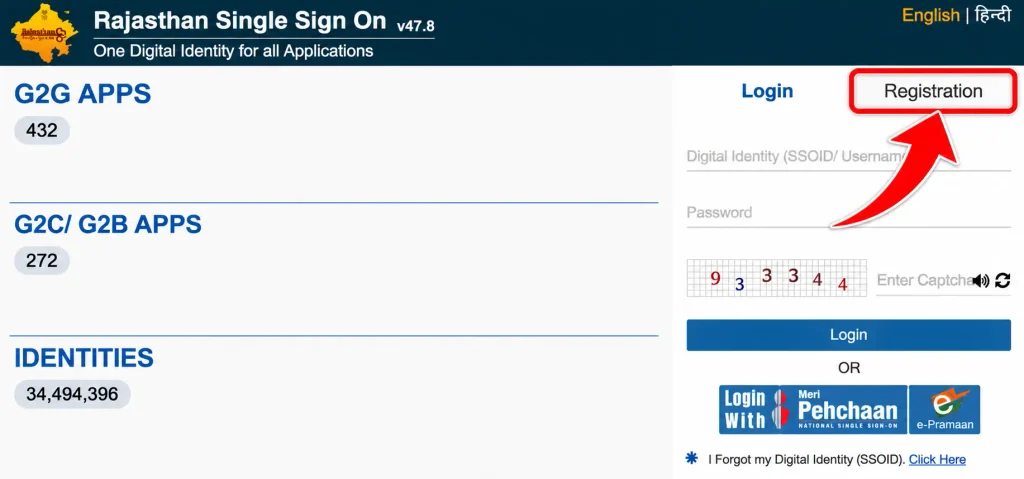
- Choose a Registration Method: Select the available registration option for your category, such as Jan Aadhaar or Google for citizens.
- Enter the Required Details: Provide the information requested on the screen. This may include your Jan Aadhaar number, business registration details, or government employee credentials.
- Complete Verification: Follow the instructions to verify your identity. If an OTP is sent to your registered mobile number, enter it in the required field.
- Create Your SSO ID and Password: Choose an available username and set a strong password wherever the portal asks you to create login credentials.
- Submit the Registration Form: Review the entered information and click the Register button to complete the process.
After successful registration, your SSO account will be created. Keep your SSO ID and password safe because you will need them to log in to the portal and access available services.
SSO ID Registration for Citizens Using Jan Aadhaar
Residents of Rajasthan can use their Jan Aadhaar details to register for an SSO account. This method helps verify the user’s identity through the Jan Aadhaar database and the registered mobile number.
Follow these steps:
- Visit the official Rajasthan SSO Portal and click on Registration.
- 2. Select the Citizen category and choose the Jan Aadhaar registration option.
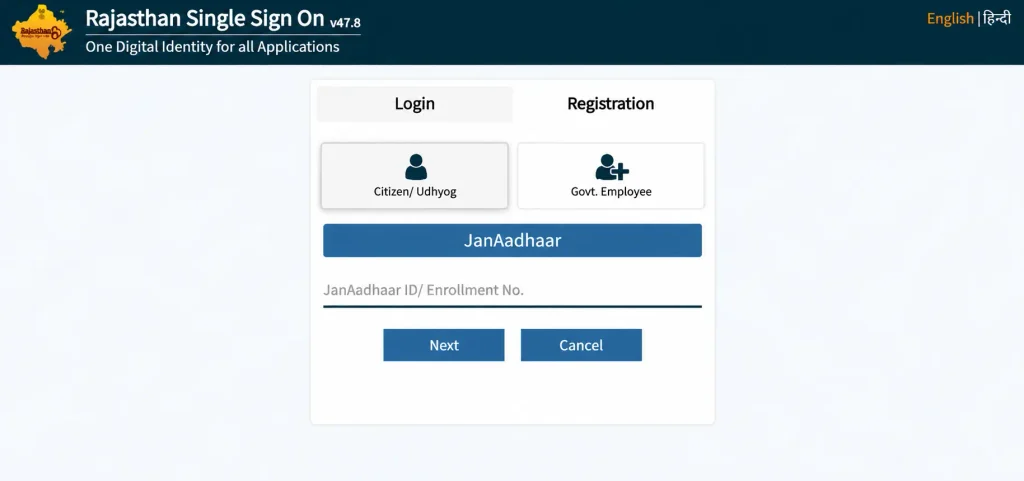
- Enter your Jan Aadhaar number, select the relevant family member, and request an OTP on the registered mobile number.
- Enter the OTP to verify your details and follow the instructions to create your SSO ID and password.
Once the registration is completed, you can use your new SSO credentials to access the available online services.
SSO ID Registration Through Google Account
Citizens who do not want to use the Jan Aadhaar registration method may be able to register using a Google account. This option is available on the citizen registration page, subject to the portal’s current registration rules.
- Open the Rajasthan SSO website and navigate to the new user registration page.
- Under the Citizen section, select the Google option to continue with Google account registration.
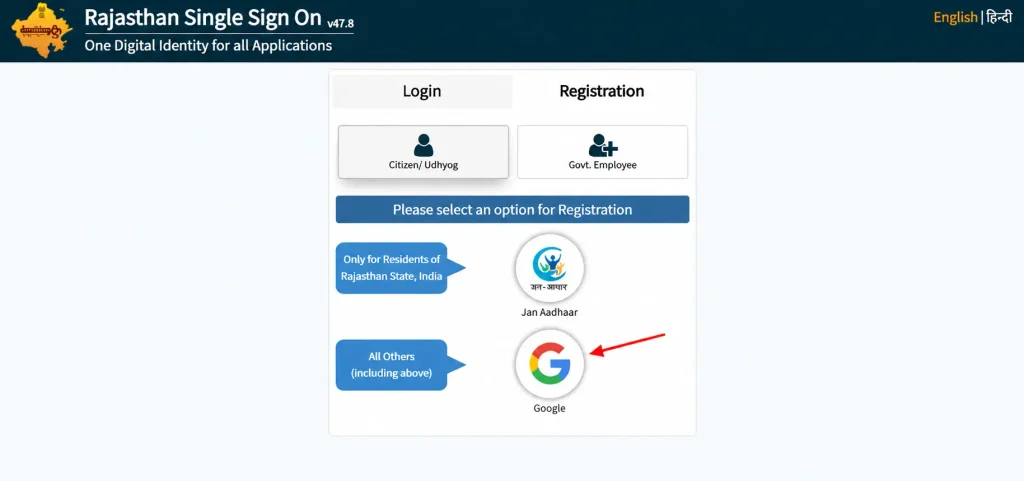
- Choose your Google account and complete the sign-in process. Provide the additional details required by the portal.
- Set your SSO login credentials, check the submitted information, and finish creating your account.
Make sure you use an active Google account that you can access whenever required. The available registration options may change, so follow the instructions displayed on the official portal.
SSO ID Registration for Government Employees
Rajasthan state government employees can create their SSO accounts using their SIPF (State Insurance and Provident Fund) credentials. This registration category is intended for eligible government employees.
The general process is as follows:
- Visit the official Rajasthan SSO website.
- Click on Registration.
- Select the Government Employee category.
- Enter your SIPF username or employee number and the required password.
- Click on Next or proceed as instructed.
- Provide any additional details requested by the portal.
- Complete the registration process and save your SSO login credentials.
Government employees should enter their official employee information correctly. If the SIPF details are not accepted, they should contact the relevant department or support team.
SSO ID Registration for Businesses (Udyog)
Business owners, firms, and eligible enterprises can register on the Rajasthan SSO Portal through the Udyog category. This option is intended for users who need access to government services related to business activities.
The general registration steps include:
- Open the Rajasthan SSO Portal.
- Select Registration from the homepage.
- Choose the Udyog category.
- Enter the required Business Registration Number (BRN) or other accepted business identification details.
- Provide the business information requested on the screen.
- Complete the verification process, if required.
- Create the SSO username and password.
- Submit the registration details to complete the process.
After successful registration, eligible business users can log in and access the services available for their account category.
Details Required for Rajasthan SSO ID Registration
The information required to create an SSO ID depends on the category you select. Before starting the registration process, keep the relevant details ready.
- Jan Aadhaar Number: Required for citizens choosing the Jan Aadhaar registration method.
- Google Account: May be used by citizens who select Google registration.
- SIPF Details: Required for eligible Rajasthan government employees.
- Business Registration Details: Businesses may need a BRN or another accepted business identifier.
- Mobile Number: May be required for OTP verification and account-related communication.
- Email Address: Keep an active email address available if the portal requests it.
Always provide accurate information during registration to avoid verification problems.
Benefits of Creating a Rajasthan SSO ID
Having an SSO account makes it easier for users to access multiple supported government services through one digital platform. Some important benefits include:
- Single Login Facility: Use one SSO ID and password for multiple linked government applications.
- Easy Online Access: Access supported services through the internet without visiting different departmental websites separately.
- Time Saving: Complete eligible online activities from home or another convenient location.
- Application Tracking: Check application information and status through supported services.
- Digital Convenience: Access available facilities through a computer or mobile browser.
- Reduced Paperwork: Complete certain government processes online, depending on the service.
The services available may differ according to your user category and the departments linked to your account.
FAQ’s
Is Rajasthan SSO ID registration free?
Yes, creating an SSO ID through the official Rajasthan SSO Portal is free. However, individual government services may have their own applicable charges.
Can I create an SSO ID without Jan Aadhaar?
Citizens may use the Google registration option if it is available on the official portal. Other categories have their own registration methods.
Can I register for SSO ID using my mobile phone?
Yes, you can open the official Rajasthan SSO website through a mobile browser and complete the registration process.
Can government employees create an SSO ID?
Yes, eligible Rajasthan government employees can register using their SIPF details through the Government Employee category.
Can business owners register on the Rajasthan SSO Portal?
Yes, eligible businesses can select the Udyog category and provide the required business registration details.