
SSO ID Login & SSO Login Rajasthan – Complete Portal Guide
The SSO ID Login process is simple and can be completed online through the official Rajasthan SSO portal. Registered users can access their accounts using their SSO ID and password. Follow these steps to log in successfully.
Steps for SSO ID Login
- Visit the Official Website: Open the Rajasthan SSO portal at https://sso.rajasthan.gov.in/.
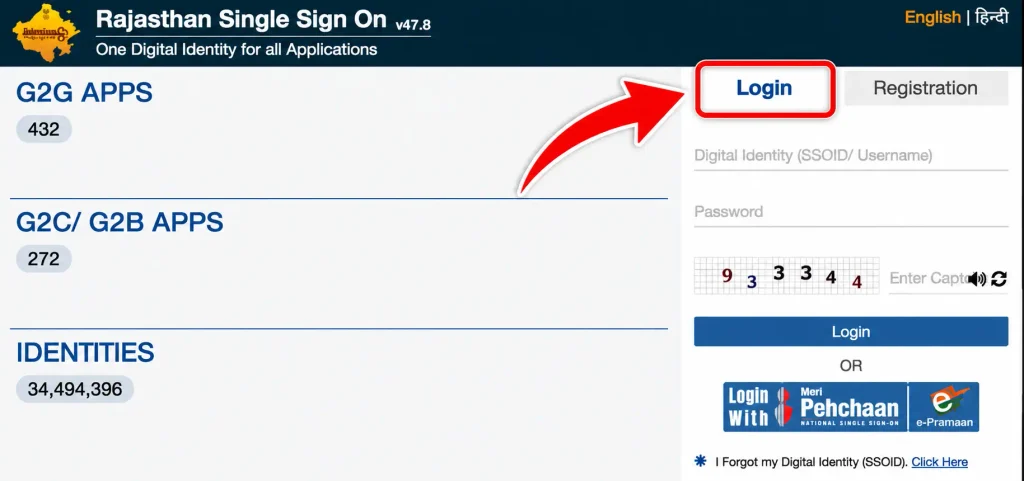
- Open the Login Section: Click on the Login option available on the homepage.
- Enter Your SSO ID: Type your registered SSO ID or username in the Digital Identity field.
- Enter Your Password: Provide the password associated with your SSO account.
- Fill in the Captcha: Enter the captcha code displayed on the screen in the required field.
- Click on Login: Check your details and click the Login button to access your SSO dashboard.
| Note: Keep your SSO ID and password confidential. If you forget your login credentials, use the Forgot SSOID or Forgot Password option on the official portal. |
Rajasthan SSO ID Login – Official Portal Details & Access Information
To access your Rajasthan SSO account, you need to visit the official government website. The portal provides separate options for registration and login, allowing new users to create an account and existing users to access their dashboards.
- Portal Name: Rajasthan Single Sign-On (SSO)
- Official Website: https://sso.rajasthan.gov.in/
- Login Facility: Online
- Available Users: Citizens, businesses, and government employees
- Login Details: Registered SSO ID and password
Always check the website address before entering your login information. Use the official portal to avoid fake websites and unauthorized services.
What to Do If You Forget Your SSO ID or Password?
Sometimes users forget their SSO ID or password and cannot access their accounts. In such situations, the Rajasthan SSO portal provides account recovery options.
Forgot SSO ID
If you cannot remember your registered SSO ID, visit the official login page and select the Forgot SSOID option, if available. Follow the instructions displayed on the screen and provide the required information to retrieve your login identity.
Forgot Password
If you remember your SSO ID but have forgotten the password, select the Forgot Password option on the login page. Choose an available recovery method and complete the verification process as instructed. After successful verification, follow the portal’s instructions to reset your password.
Keep your registered mobile number and other recovery details accessible because they may be required during the process.
Services Available After SSO ID Login
Once you successfully complete the SSO ID Login, you can access different online services available through the Rajasthan government platform. The services displayed on your dashboard may depend on your registration category and eligibility.
Some important service categories include:
- Employment Services: Access recruitment-related facilities, job applications, and available employment information.
- Education Services: Explore scholarship facilities, examination-related services, and other academic resources.
- e-Mitra Services: Access supported citizen services and online payment facilities.
- Agriculture Services: Find information about agricultural schemes, subsidies, and farmer-related facilities.
- Healthcare Services: Access available government health services and related online facilities.
- Revenue Services: Explore land and revenue department services.
- Transport Services: Access available vehicle and driving licence-related facilities.
- Social Welfare Services: Find information about eligible pension schemes and government welfare programmes.
These facilities help users access different departmental services without repeatedly creating separate accounts.
Common Problems During Rajasthan SSO Login
Although the login process is simple, users may occasionally experience technical problems while accessing their accounts. Some common issues and their possible solutions are explained below.
- Incorrect SSO ID or Password: If you receive an invalid login message, check your username and password carefully. Make sure Caps Lock is not enabled accidentally.
- Captcha Not Working: Enter the captcha exactly as displayed. If the code is unclear or expired, refresh it and try again.
- Website Not Opening: Check your internet connection and reload the official website. You can also try using another browser.
- Forgot Login Credentials: Use the available Forgot SSOID or Forgot Password recovery options on the official portal.
- OTP Not Received: Check whether your registered mobile number is active and has network coverage. Wait briefly before requesting another OTP.
- Account Access Problems: If you are still unable to access your account, contact the official SSO helpdesk for assistance.
Tips for Keeping Your SSO ID Account Secure
Your SSO account may provide access to important personal information and government-related services. Therefore, it is important to follow basic security practices.
- Create a strong password that is difficult to guess.
- Never share your password or OTP with unknown people.
- Always log out after using your account on a shared computer.
- Avoid accessing your account through suspicious links.
- Use the official Rajasthan SSO website for registration and login.
- Keep your registered mobile number and email address updated wherever required.
Following these precautions can help protect your account from unauthorized access.
Benefits of Rajasthan SSO Login
The Rajasthan SSO portal offers several advantages to registered users. Its single-login system makes accessing supported government services more convenient and reduces the need to remember multiple usernames and passwords.
Users can access available services online, check application-related information, explore different government departments, and complete supported activities from their homes. The platform also helps reduce paperwork and unnecessary visits to government offices.
For citizens, businesses, and government employees, the portal provides a common digital platform for accessing services according to their respective registration categories.
FAQ’s
What is SSO ID Login?
SSO ID Login is an online facility that allows registered users to access Rajasthan government services using a single username and password.
What is the official website for Rajasthan SSO Login?
The official website is https://sso.rajasthan.gov.in/. Users can visit this portal for registration, login, and available government services.
Can I access SSO ID Login on my mobile?
Yes, you can open the official Rajasthan SSO website through a mobile browser and log in using your registered credentials.
What should I do if I forget my SSO ID password?
Click on the Forgot Password option on the login page and follow the available instructions to recover or reset your password.
Who can use the Rajasthan SSO Portal?
Citizens, businesses, and government employees can register under their respective categories and access the services available to them.