
How to Reset Forgotten SSO ID Password in Rajasthan?
The Forgotten SSO ID Password in Rajasthan recovery process allows registered users to regain access to their accounts without creating a new SSO ID. The Rajasthan SSO Portal provides password recovery options through available verification methods, such as registered mobile numbers, email addresses, and Aadhaar-based verification (if available). Users can follow a few simple steps to reset their password and continue accessing online government services.
How to Reset a Forgotten SSO ID Password?
If you cannot remember your Rajasthan SSO account password, follow the steps below to start the recovery process. Make sure you have access to the mobile number or email address registered with your account.
- Visit the Official SSO Website: Open your browser and visit the Rajasthan Single Sign-On Portal at https://sso.rajasthan.gov.in/.
- Open the Login Section: On the homepage, select the Login option to access the SSO sign-in page.
- Click on Forgot Password: Look for the Forgot Password option below the login form and select it to open the password recovery page.
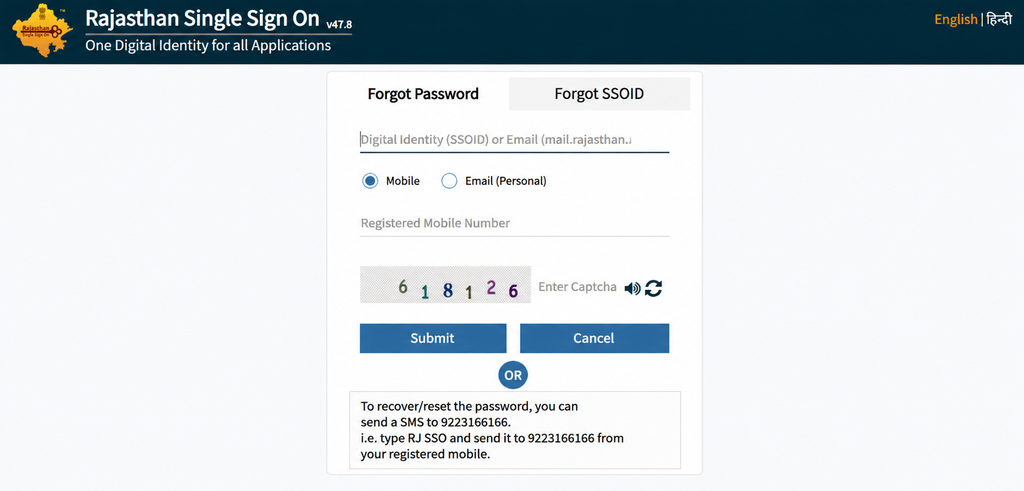
- Enter Your Account Details: Provide the requested information, such as your SSO ID or registered mobile number or email address, according to the options displayed on the portal.
- Complete the Verification Process: Select an available verification method and follow the instructions. If an OTP is sent to your registered contact details, enter it in the required field.
- Receive Your Temporary Password: After successful verification, follow the portal’s instructions to receive or access your temporary password.
- Log In to Your Account: Return to the SSO login page and enter your SSO ID and the temporary password provided through the recovery process.
- Set a New Password: If the portal prompts you to change the temporary password, create a new password and save the changes.
After completing these steps, you should be able to access your Rajasthan SSO account using the updated credentials. Keep your new password in a safe place and do not share it with anyone.
How to Reset SSO ID Password Through Email?
You can recover your forgotten SSO password using your registered email address by following these steps:
- Visit the Official Portal: Open Rajasthan SSO.
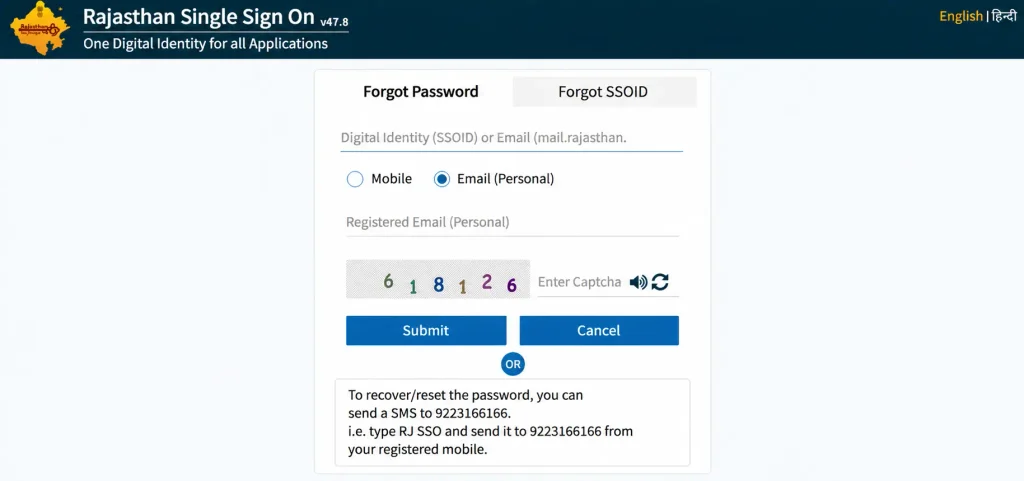
- Click Forgot Password: Select the Forgot Password option on the login page.
- Enter Your Details: Provide your SSO ID or registered email address.
- Choose Email Verification: Select the email recovery option, if available.
- Verify Your Account: Enter the OTP received in your registered email.
- Reset Your Password: Follow the portal instructions to create or receive a new password.
| Important Note: Make sure you have access to the email address registered with your SSO account. If the OTP email is not visible in your inbox, check the Spam or Junk folder. |
How to Reset SSO ID Password Using Aadhaar ID/VID?
If you have forgotten your Rajasthan SSO password, you can follow the recovery process using Aadhaar ID/VID, if this option is available for your account.
- Visit the Official Portal: Open Rajasthan SSO.
- Select Forgot Password: Click on the Forgot Password option.
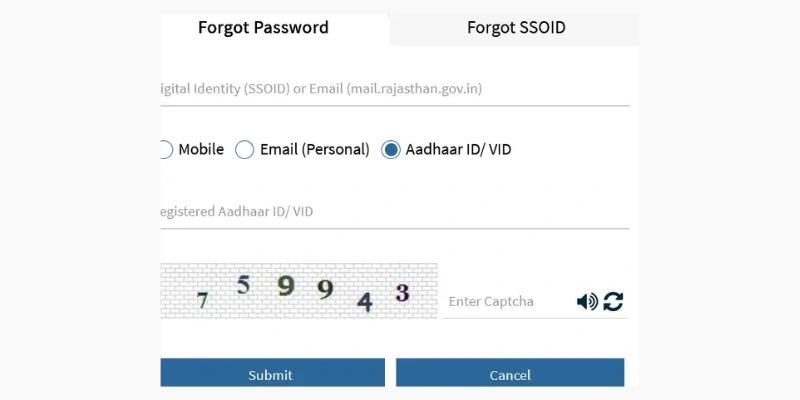
- Enter Your SSO Details: Provide your SSO ID or other requested details.
- Choose Aadhaar ID/VID: Select the Aadhaar-based verification option, if displayed.
- Complete Verification: Follow the on-screen instructions to verify your identity.
- Reset Password: After successful verification, follow the portal instructions to receive or set a new password.
| Note: Aadhaar ID/VID verification may not be available for every account. The recovery options displayed on the official portal will determine how you can reset your password. |
How to Contact Rajasthan SSO Helpdesk for Password Issues?
If you are unable to reset your password even after following the recovery steps, you can contact the Rajasthan SSO helpdesk. The support team can guide you regarding login problems, account verification, and other technical difficulties.
You can use the following contact details for general SSO-related assistance:
- Helpline Numbers: 0141-2925554 and 0141-2925555
- Email Support: [email protected]
- Official Website: https://sso.rajasthan.gov.in/
When contacting support, explain the problem clearly. Never send your password or OTP to anyone by email or phone. You may be asked to provide account-related information for verification.
FAQ’S
How can I reset my forgotten Rajasthan SSO ID password?
Visit the official Rajasthan SSO portal, select Forgot Password, enter the requested account details, and complete the available verification process. Follow the instructions to receive or set a new password.
Can I recover my SSO password without visiting the helpdesk?
Yes, you can try the self-service Forgot Password facility available on the official SSO portal. Helpdesk assistance may be required if online verification is unsuccessful.
Is an OTP required to reset the SSO ID password?
An OTP may be required to verify your identity. The available verification method depends on the options displayed during the password recovery process.
Can I reset my SSO password using my mobile phone?
Yes, you can open the official Rajasthan SSO website through a mobile browser and follow the password recovery instructions.
What should I do if I have forgotten both my SSO ID and password?
First, recover your SSO ID using the official Forgot SSOID facility. Once you have your SSO ID, use the Forgot Password option to reset your password.